Validation Kit for BactoSense
General information
The Validation Kit is a reagent kit used to validate the proper functioning of BactoSense. Its reagents have been developed for use after measuring drinking water samples. The kit may not be effective if stored under inadequate conditions, if expired, or if samples other than drinking water have been measured.
Store the kit refrigerated at 2–8 °C (35–47 °F), away from light. Under these conditions, the shelf-life is one year. The kit provides 10 validations.
Safety information
In case of skin contact, rinse immediately and abundantly with fresh water. In case of pain or irritation, consult a doctor.
In case of eye contact, flush eyes immediately with flowing water for 10–15 minutes, holding eyelids apart, and consult a doctor.
Carefully follow this manual and the BactoSense user manual.
Contents
| Item | Quantity | SDS document number | Use |
|---|---|---|---|
| Alcohol Wipes | 10 | — | Single use |
| Beads Solution | 10 | 50106 | Single use |
| Reference Solution | 10 | — | Single use |
| Sterile Solution | 10 | — | Single use |
| Tube Holder | 1 | — | Multiple uses |
Discard single-use items according to local waste disposal regulations. Safety data sheets (SDS) are available from bNovate or your local distribution partner upon request.
When to use the Validation Kit
Perform an instrument validation:
- After shipping or other long-distance transport with vibration or shock.
- After storing the instrument for more than one month.
- If there are indications that measurement results could be erroneous.
The full validation consists of three parts, performed in order: Optical Validation, Reference Validation and Sterile Validation. All acceptance criteria must be met. A full validation takes approximately 3 hours.
In specific cases, a partial validation can be performed. Complete the preparations first, then follow the relevant part.
Preparations
- Verify that the kit has not expired and has been stored under the specified conditions.
- For a full validation, remove one alcohol wipe, one Beads Solution, one Reference Solution, one Sterile Solution and the Tube Holder. For a partial validation, take only the wipe, Tube Holder and relevant solution.
- Make sure the manual sampling device is tightly installed on BactoSense.
- Unpack the alcohol wipe. Wipe the sampling needle from top to bottom to remove contaminants. Let it dry for 30 seconds.
- Log in as Admin. From Home → Maintenance → Self-check, press Rerun. Verify that every test displays a green PASS.
- Open Home → Maintenance → Instrument validation. Check Activate Instrument validation and press Save.
- For a full validation, continue with Part A. For a partial validation, continue with the corresponding part.
Part A: Optical Validation
This tests the optical system by measuring a solution containing fluorescent particles.
-
Complete the preparations if not already done.
-
Attach the wash station to the manual sampling device. If none is available, attach an empty, clean 5 mL screw-cap tube.
-
As Admin, open Home → Manual mode → Start. Select Clean Sampling Device with Washstation, with one replication. Without a wash station, select Clean Sampling Device, with two replications. Press Next and start the protocol.
-
After completion, shake the Beads Solution tube vigorously for 10 seconds, by hand or using a vortex mixer.
-
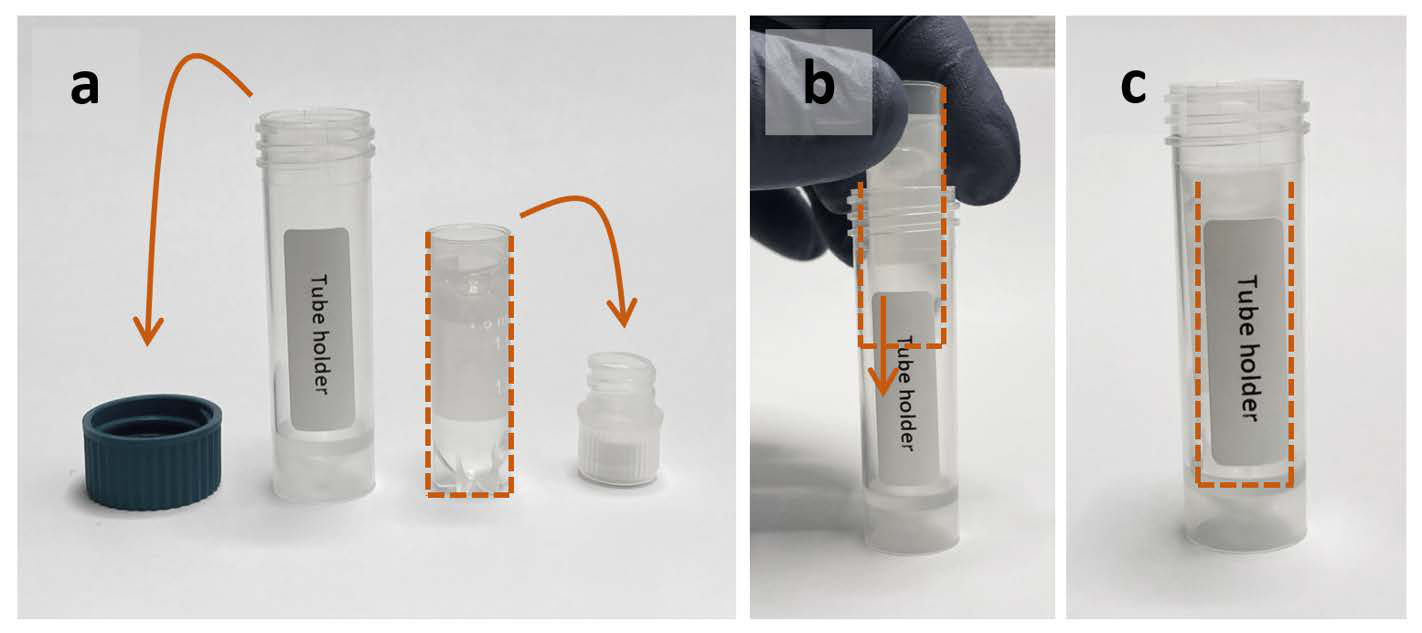
Remove the caps from the Beads Solution tube and Tube Holder. Insert the opened tube into the holder. Remove the wash station and attach the holder containing the Beads Solution to the manual sampling device.
Use the whole reagent tubeInsert the entire reagent tube into the Tube Holder, rather than pouring its contents into the holder.
-
Open Home → Manual mode → Start. Select Prime, with one replication. Press Next and start.
-
Return to the protocol overview. Select Beads Analysis, with two replications. Press Next and start.
-
Review the results. All the following criteria must be met:
TCC: 50,000–75,000/mL
Channel CV (%) Median FL1 Less than 15 5.7–6.5 FL2 Less than 20 5.1–5.7 SSC Less than 25 4.7–6.3 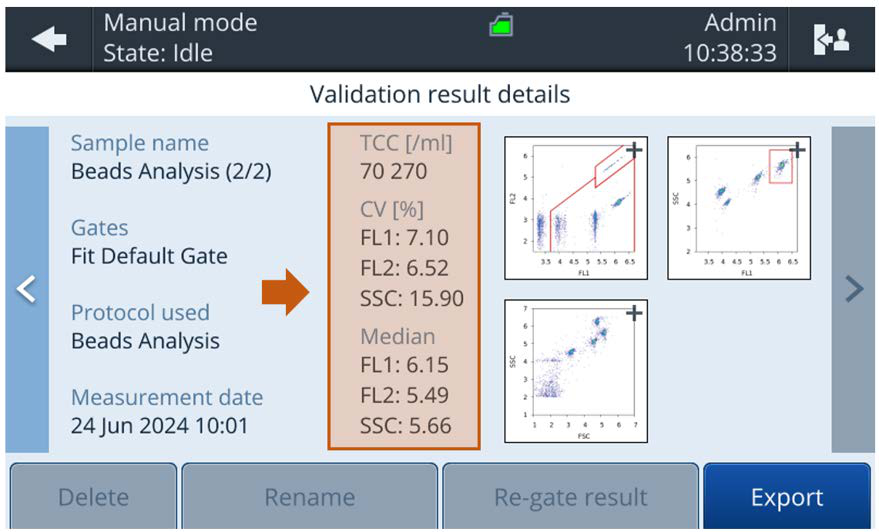
-
If the test passes, remove the Tube Holder, remove the Beads Solution tube, close its cap and discard it. Continue with Part B.
If it fails, check the kit's expiry and storage conditions, then repeat, making sure the Beads Solution is well mixed. If failures persist, contact bNovate support or your local service representative.
Part B: Reference Validation
This validates the automated staining process.
-
Complete the preparations if performing this part alone.
-
Attach the wash station, or an empty, clean 5 mL screw-cap tube if no wash station is available.
-
As Admin, open Home → Manual mode → Start. Run Clean Sampling Device with Washstation, with one replication. Without a wash station, run Clean Sampling Device, with two replications. Press Next and start.
-
Uncap the Reference Solution tube and insert the entire tube into the Tube Holder, as shown in Part A. Remove the wash station and attach the holder containing the Reference Solution.
-
Open Home → Manual mode → Start. Run Prime, with one replication.
-
Return to the protocol overview. Select Water Analysis, with two replications. In Gates, select the default gate for the cartridge type, for example ICC Default Gate or TCC Default Gate. Press Next and start.
-
Compare the main bacteria clouds to the reference criteria:
Dotplot Acceptance criterion FL1 / FL2 Main cloud above 4.5 on the FL1 axis and below 5 on the FL2 axis FL1 / SSC Main cloud above 2 and below 5.5 on the SSC axis 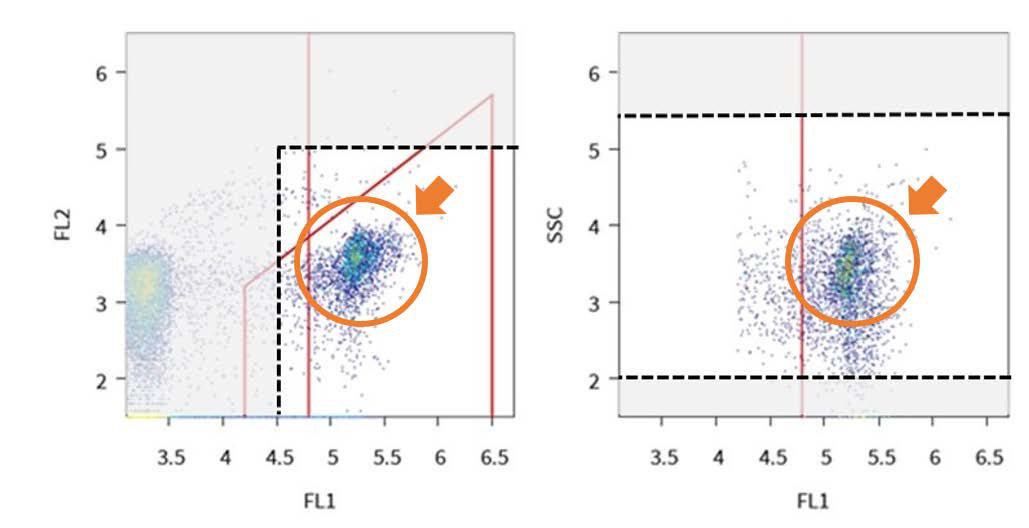 Appearance of the clouds
Depending on the cartridge and storage conditions, the clouds may differ from the example.
-
If the test passes, remove the Tube Holder, remove the Reference Solution tube, close its cap and discard it. Continue with Part C.
If it fails, check the kit's expiry and storage conditions. Repeat with a fresh Reference Solution. If failures persist, contact bNovate support or your local service representative.
Part C: Sterile Validation
This validates the cleanliness of BactoSense by measuring cell-free water.
-
Complete the preparations if performing this part alone.
-
Attach the wash station, or an empty, clean 5 mL screw-cap tube if no wash station is available.
-
As Admin, open Home → Manual mode → Start. Run Clean Sampling Device with Washstation, with one replication. Without a wash station, run Clean Sampling Device, with two replications. Press Next and start.
-
Uncap the Sterile Solution tube and insert the entire tube into the Tube Holder, as shown in Part A. Remove the wash station and attach the holder containing the Sterile Solution.
-
Open Home → Manual mode → Start. Run Prime, with one replication.
-
Return to the protocol overview. Select Water Analysis, with two replications. In Gates, select ICC Default Gate or TCC Default Gate, according to the cartridge. Press Next and start.
-
Review the results. The applicable criterion must be met:
Cartridge Acceptance criterion TCC TCC less than 300/mL ICC ICC less than 100/mL -
If the test passes, remove the Tube Holder, remove the Sterile Solution tube, close its cap and discard it. Return the holder to the Validation Kit and attach the wash station to the manual sampling device.
If it fails, check the kit's expiry and storage conditions. Perform biological decontamination, then repeat with a fresh Sterile Solution. If failures persist, contact bNovate support or your local service representative.
-
Open Home → Maintenance → Instrument validation. Uncheck Activate Instrument validation and press Save.
You have successfully validated your instrument when all required parts have passed.