Cleaning Kit for BactoSense
General information
The Cleaning Kit deep-cleans the fluidic system and manual sampling device of BactoSense. Its reagents clear biological and non-biological contamination arising from the instrument's intended use. Effectiveness against contamination from other applications cannot be guaranteed. Attempts to clean with other chemicals or materials are the user's sole responsibility.
Store the kit at 2–25 °C, in the dark. Under these conditions, the shelf-life is one year. The kit provides five biological and five non-biological decontaminations.
Safety information
In case of skin contact, rinse immediately and abundantly with fresh water. In case of pain or irritation, consult a doctor.
In case of eye contact, flush eyes immediately with flowing water for 10–15 minutes, holding eyelids apart, and consult a doctor.
Some reagents are toxic or irritating. Wear protective equipment; do not ingest or inhale. Some reagents are corrosive to metals.
Carefully follow this manual and the BactoSense user manual.
Contents
| Item | Quantity | SDS document number | Use |
|---|---|---|---|
| Alcohol wipes | 10 | — | Single use |
| Cleaning solution | 5 | 50102 | Single use |
| Decontamination solution | 5 | 50103 | Single use |
| Rinsing solution | 10 | 50104 | Single use |
| Tube holder | 2 | — | Reusable |
Discard single-use items according to local waste disposal regulations. Safety data sheets are available from bNovate or your local distribution partner upon request.
When to use the Cleaning Kit
| Indications | Protocol |
|---|---|
| The manual sampling device may have been contaminated through improper storage; the instrument stopped in an error state with a loaded sample; or persistent biological contamination cannot be cleared with the Wash Station. | Biological contamination |
| Visible deposits on the sampling needle; frequent High baseline in SSC or Air bubble detection warnings; or electronic noise in the dotplots much higher than usual, exceeding 4 on the FL1 axis. | Non-biological contamination |
Biological contamination
This protocol clears biological contamination from the instrument and manual sampling device.
Approximately 20 minutes. Requires one alcohol wipe, one Decontamination solution, one Rinsing solution and one Tube holder.
Carefully follow the instructions and wear protective gloves and safety glasses.
-
Make sure the manual sampling device is tightly installed on BactoSense.
-
Unpack an alcohol wipe. Wipe the needle from top to bottom to remove contaminants. Let it dry for 30 seconds.
-
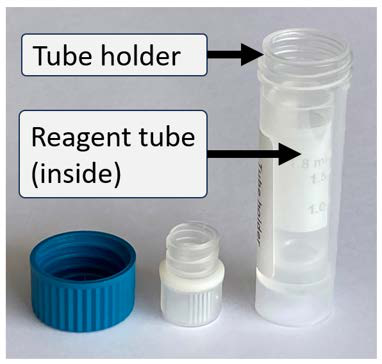
Take a Decontamination solution tube and Tube holder. Remove their caps and insert the opened tube into the holder. Attach the holder containing the tube to the manual sampling device.
Use the whole reagent tubeInsert the entire tube, rather than pouring its reagents into the holder.
-
Open Home → Manual mode → Start.
-
Select Prime in Protocol and configure two replications in Replications.
-
Press Next and Start.
-
After both Prime processes finish, remove the holder and discard the Decontamination solution tube.
-
Uncap a Rinsing solution tube, insert the entire tube into the holder and attach the holder to the manual sampling device.
-
Press New, or open Home → Manual mode → Start again.
-
Select Prime, with two replications.
-
Press Next and Start.
-
After both Prime processes finish, remove the holder and discard the Rinsing solution tube.
-
Close the holder with its cap and return it to the Cleaning Kit box.
-
The decontamination sequence is complete. Follow After cleaning.
Non-biological contamination
This protocol clears non-biological contamination from the instrument and manual sampling device.
Approximately 3.5 hours. Requires one alcohol wipe, one Cleaning solution, one Rinsing solution and one Tube holder.
Carefully follow the instructions and wear protective gloves and safety glasses.
- Make sure the manual sampling device is tightly installed on BactoSense.
- Unpack an alcohol wipe. Wipe the needle from top to bottom to remove contaminants. Let it dry for 30 seconds.
- Take a Cleaning solution tube and Tube holder. Remove their caps, insert the entire opened tube into the holder, as illustrated above, and attach the holder to the manual sampling device.
- Open Home → Manual mode → Start.
- Select Prime, with two replications.
- Press Next and Start.
- After the protocols finish, wait 3 hours.
- Remove the holder and discard the Cleaning solution tube.
- Uncap a Rinsing solution tube, insert the entire tube into the holder and attach it to the manual sampling device.
- Press New, or open Home → Manual mode → Start again.
- Select Prime, with three replications.
- Press Next and Start.
- After all three Prime processes finish, remove the holder and discard the Rinsing solution tube.
- Close the holder with its cap and return it to the Cleaning Kit box.
- The decontamination sequence is complete.
After cleaning
To measure a sample now, attach it to the sampling device and first perform two Prime processes. This ensures the highest accuracy of your results.
If you do not plan to measure samples, attach a clean, empty tube or the Wash Station. Perform two Prime processes before measuring the next sample.